Troubleshooting: "Another Instance is Already Running" Error
Written By AstroBob
Last updated 10 months ago
If you see the following message when attempting to start LaunchBox or Big Box:
Another instance of LaunchBox or Big Box is already running. You may need to wait for the previous instance to exit.
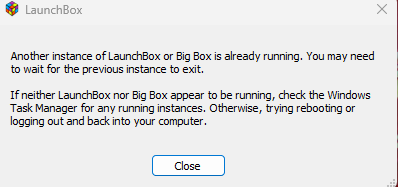
This usually means LaunchBox is still performing operations in the background, or that it didn’t shut down correctly while performing those operations in the background.
Why This Happens
When LaunchBox or Big Box closes, it performs several actions in sequence:
Writes all in-memory data to disk (i.e., games, playlists, settings)
Optionally zips and stores backups of your Data folder
Finalizes the process and closes
If any step is interrupted or hangs (e.g., due to drive permissions, antivirus interference, or third-party sync tools), the app can get stuck trying to perform an action it cannot finish.
This can occur regardless of whether backups are enabled, but backups add another layer of file operations that can also trigger the issue, especially on slower drives or heavily populated libraries.
Switching Between LaunchBox & Big Box
Before diving into the specifics of this error, don’t forget that the best way to seamlessly transition between LaunchBox and Big Box (and vice versa) is to use the commands built into each app for switching. This ensures that the open app is gracefully shut down first before transitioning to the other app.
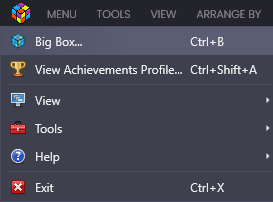
In LaunchBox:
Click the LaunchBox logo in the top left
Select
Big Box(alternatively you can use the keyboard shortcutCtrl + B
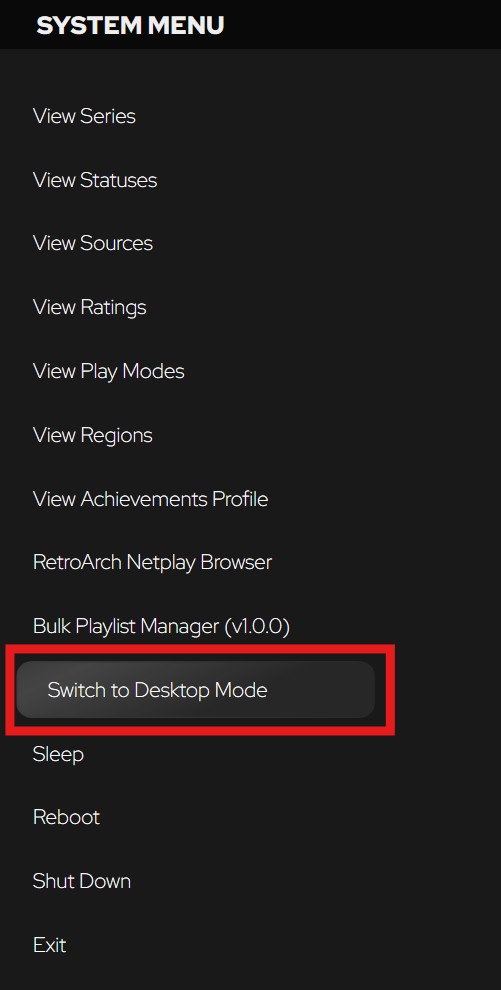
In Big Box:
Navigate to the System Menu
Select
Switch To Desktop Mode
Using these methods is the best way to transition between apps and reduces the need to wait for one app to close and finish its cleanup processes before the other opens.
That said, there are cases when you may still see the above error. In that case, read on.
Common Causes
A sync tool like OneDrive, Dropbox, or Google Drive interfering with file operations
Backup process is taking a long time due to large libraries (500+ games, and/or tens of thousands of playlists)
Permissions issues preventing file access or archive creation
Antivirus software blocking or slowing shutdown steps
LaunchBox being installed in a location that limits write permissions
What You Can Do
1. Check Task Manager
If LaunchBox won’t launch and you see this message, open Task Manager, find any LaunchBox.exe or BigBox.exe processes, and end them manually. Note that there is a small risk of LaunchBox not writing data such as game edits or playlists if it was interrupted as the process was ended.
2. Disable Background Syncing Tools
If LaunchBox is installed inside a synced folder, move it to a standard location (like C:\Games\LaunchBox) and avoid sync folders like Documents, Desktop, or cloud drives.
3. Temporarily Disable Antivirus or Whitelist LaunchBox
Antivirus tools may lock or scan files as they’re being written, causing the shutdown process to freeze.
4. Turn Off Automatic Backups (Use With Caution)
Go to Tools > Options > Data > Backups and untick Create Backup On Application Close.
⚠️ Important: Disabling backups means your data won’t be automatically saved at close. Only do this if you're comfortable creating manual backups periodically using Tools > File Management > Create Data Backup.
5. Run LaunchBox with Proper Permissions
Ensure LaunchBox has write access to its folder. Avoid running as Administrator if LaunchBox is installed in a user-level directory (like Documents) as this may cause permissions mismatches.
6. Wait a Few Seconds Before Relaunching
Sometimes the app is still wrapping up background tasks for a few moments after closing. Give it 5–10 seconds before relaunching.
If the Problem Persists
You can:
Try creating a manual backup and disabling automatic backups to see if it improves shutdown times
Move LaunchBox to a location outside of synced or protected directories
We're continuing to investigate this issue as it affects a subset of users and can vary depending on hardware, library size, and system configuration.